Node Configuration
The node configuration file enables you to customize connectivity settings, adjust node management options such as database or identity file locations, implement custom strategies, and more.
Create and apply configuration file to your node
Please select your platform:
- Docker
- Docker compose
- Dappnode
- Native
-
Download HOPRd configuration file
Download the example file for Docker: hoprd-docker.cfg.yaml
-
(Optional) modify configuration file
By default, the strategy settings file is pre-configured and works well as is. However, if you have a clear understanding of the settings and their implications, you can customize them to better align with your specific needs. For detailed instructions, please refer to the section: Understanding Node Strategies.
-
Upload configuration file
Navigate to the
hoprddirectory on your machine and upload the newly created configuration file there. Ensure that the configuration file is named hoprd-docker.cfg.yaml. -
Launch HOPRd node
-
After uploading the configuration file, stop your current node.
-
Start your node with the Docker command. It already reads
/app/hoprd-db/hoprd-docker.cfg.yaml. -
Paste your Docker command into the terminal window and execute it.
-
Wait about a minute, then follow Verify your migration in the Troubleshooting guide to confirm your node is running correctly on HOPRd v5.0.0.
-
Inside the compose folder, navigate to the hoprd/conf subfolder and make the necessary edits to the hoprd.cfg.yaml file:
-
Locate
hopr.host.address.IPv4and set your public IP -
Locate
hopr.host.portand expose port 9091-
The default port for peer-to-peer communication is 9091.
-
If you’ve set a different port using the HOPRD_P2P_PORT environment variable, make sure to use that one instead.
-
If you plan to run HOPRd node(s) behind NAT (Network Address Translation), such as on computers or servers at home or in an office environment, you must expose port 9091 to the public so that other nodes on the HOPR network can connect to your node. For instructions, see our port forwarding guide.
-
-
Locate
hopr.safe_module.safe_addressand enter your Safe wallet addressAdd your Safe wallet address, more details under safe_module.
-
Locate
hopr.safe_module.module_addressand enter your Module addressAdd your Module address, more details under safe_module.
-
Locate
blokli_urland set the Piz Palu endpointChange
https://blokli.prod.hoprnet.linktohttps://blokli.piz-palu.gnosisvpn.io.
By default, the strategy settings file is pre-configured and works well as is. However, if you have a clear understanding of the settings and their implications, you can customize them to better align with your specific needs. For detailed instructions, please refer to the section: Understanding Node Strategies.
-
Download HOPRd configuration file
Download the example file specifically for the Dappnode: hoprd.cfg.yaml
-
(Optional) modify configuration file
By default, the strategy settings file is pre-configured and works well as is. However, if you have a clear understanding of the settings and their implications, you can customize them to better align with your specific needs. For detailed instructions, please refer to the section: Understanding Node Strategies.
noteAdjust the strategies section according to your needs; no other configuration is required.
-
Upload configuration file
-
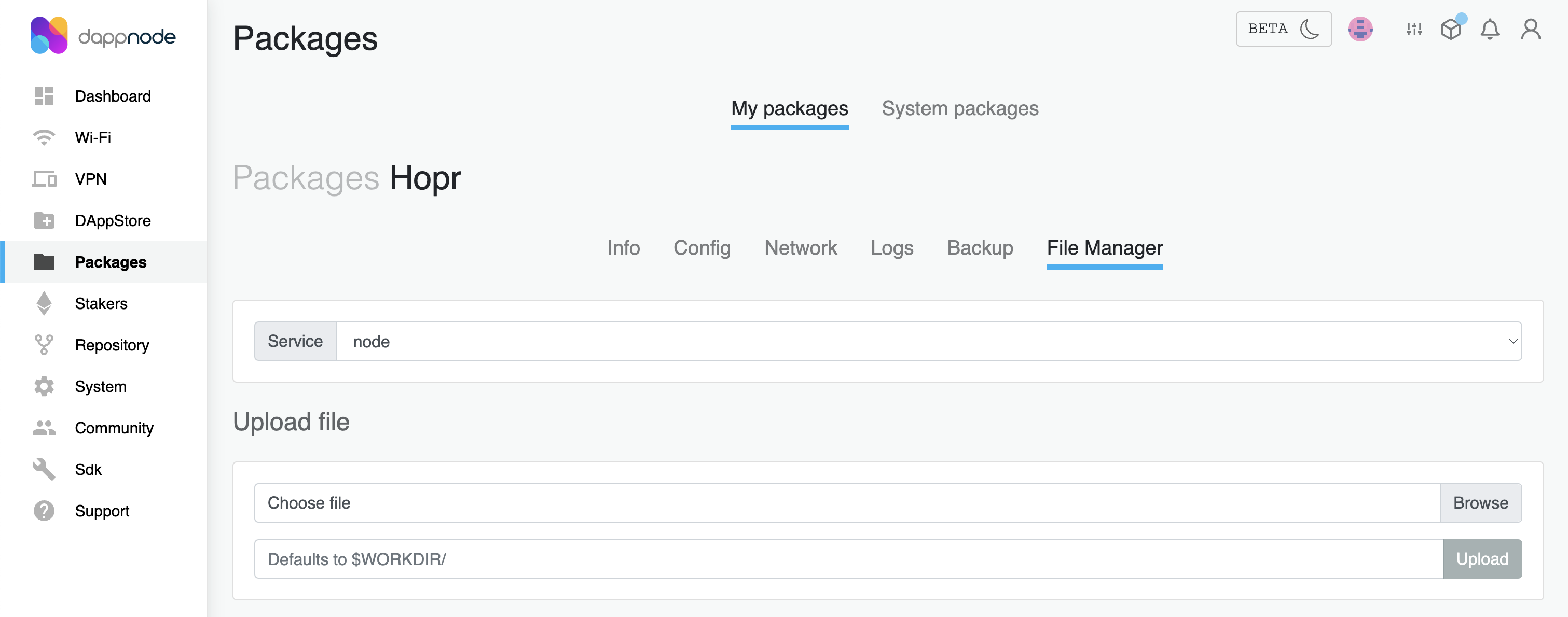
After adjusting the configuration file, connect to your Dappnode dashboard, locate the HOPR package, and navigate to the File Manager tab.
-
In the Upload file section, click the Browse button next to the Choose file field, then select your newly created configuration file. Ensure that the configuration file is named hoprd.cfg.yaml.
-
In the text field under the Upload file section, enter the path
/app/hoprd/conf/.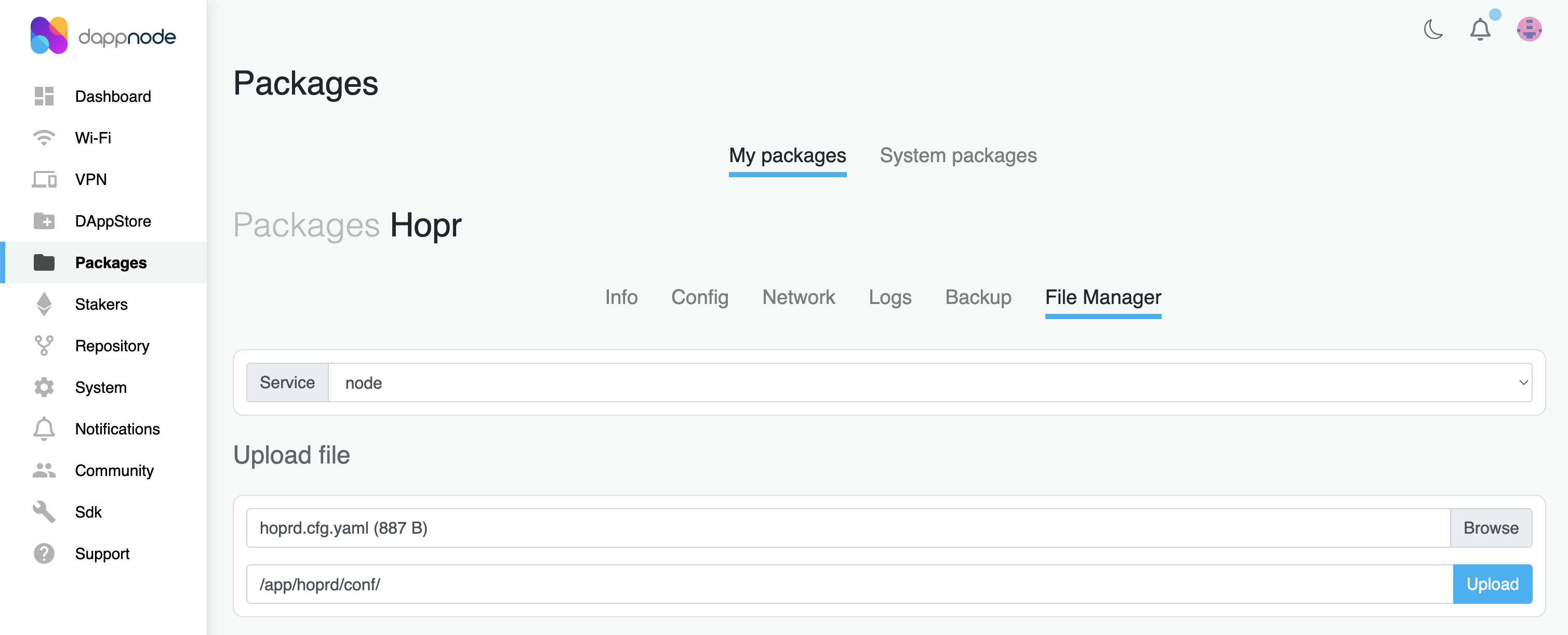
-
Click the Upload button and wait for the upload to finish.
-
-
Restart HOPRd package
-
Go to the Info page within your HOPR package, and click the Restart button to restart your node.
-
Wait about a minute, then follow Verify your migration in the Troubleshooting guide to confirm your node is running correctly on HOPRd v5.0.0.
-
Inside the hoprd/conf folder, open hoprd-binary.cfg.yaml and update the following keys. The file already sets blokli_url to the Piz Palu endpoint, so leave that line as it is.
-
Locate
hopr.host.address.IPv4and set your public IP -
Locate
hopr.host.portand expose port 9091If you plan to run HOPRd node(s) behind NAT (Network Address Translation), such as on computers or servers at home or in an office environment, you must expose port 9091 to the public so that other nodes on the HOPR network can connect to your node. For instructions, see our port forwarding guide.
-
Locate
hopr.safe_module.safe_addressand enter your Safe wallet addressAdd your Safe wallet address, more details under safe_module.
-
Locate
hopr.safe_module.module_addressand enter your Module addressAdd your Module address, more details under safe_module.
-
Locate
identity.fileand set the path to the identity fileAdd the full path to your hopr.id identity file.
Example:
/root/hoprd/conf/hopr.id -
Locate
identity.passwordand set your identity passwordEnter the password that protects your identity file. Make sure to write down this password, as you will need it if you ever need to restore your node in the future. For guidance on creating a secure password, refer to this guide.
-
Locate
api.authand specify the secret token for the REST APICreate a secret token, which is required for connecting to your node via REST API. For guidance on creating a secure secret token, refer to this guide. Keep
!Tokenand the quotes around the token.Example:
api:auth: !Token "My#S3cur1ty#Token"
Understanding configuration file settings
The configuration file is written in YAML. Below is an example of a complete file, followed by a description of each section.
blokli_url: https://blokli.piz-palu.gnosisvpn.io
identity:
  file: /app/hoprd-db/hopr.id
  password: "<YOUR_IDENTITY_PASSWORD>"
db:
  data: /app/hoprd-db/data
  initialize: true
  force_initialize: false
api:
  enable: true
  auth: !Token "<YOUR_API_TOKEN>"
  host:
    address:
      IPv4: 0.0.0.0
    port: 3001
  session_flow_control: robust
hopr:
  announce: true
  host:
    address:
      IPv4: 1.2.3.4
    port: 9091
  safe_module:
    safe_address: "0x0000000000000000000000000000000000000000"
    module_address: "0x0000000000000000000000000000000000000000"
  network:
    probe_interval: "3s"
    probe_recheck_threshold: "10s"
strategy:
  allow_recursive: false
  strategies:
    - AutoRedeeming:
        redeem_all_on_close: true
        minimum_redeem_ticket_value: "1 wxHOPR"
        redeem_on_winning: true
    - ChannelLifecycle: {}
Keep these rules in mind when you edit the file:
-
Unknown keys stop the node. HOPRd rejects any key it doesn't recognize, so a typo or a key from an older version prevents the node from starting.
-
Durations are written with a unit, for example
"3s","10m"or"24h". -
Command-line flags and environment variables override the file. For example,
--passwordorHOPRD_PASSWORDreplacesidentity.password, and--blokliUrlorHOPRD_BLOKLI_URLreplacesblokli_url. -
Check the file before you start the node. The Docker image validates the configuration at startup and prints any errors to the logs. To print a complete file with all default values, run:
docker run --rm europe-west3-docker.pkg.dev/hoprassociation/docker-images/hoprd:5.0.0 hoprd-cfg -d
The latest sample configuration file is available in the HOPRd GitHub repository.
blokli_url
The URL of the Blokli indexer your node uses to read the blockchain. HOPRd v5 doesn't connect to an RPC provider directly.
blokli_url: https://blokli.piz-palu.gnosisvpn.io
| Settings | Default value | Description |
|---|---|---|
blokli_url | Required in every configuration file, even when you also pass --blokliUrl. For the Piz Palu network, use https://blokli.piz-palu.gnosisvpn.io. |
hopr.host
Specifies the host to listen on for the HOPR P2P protocol.
hopr:
  host:
    address:
      IPv4: 1.2.3.4
    port: 9091
| Settings | Default value | Description |
|---|---|---|
hopr.host.address.IPv4 | 0.0.0.0 | The external IP address of the machine where the node is running. Refer to the FAQ guide to determine if your IP address meets the requirements. If you use a DDNS hostname instead of an IP address, replace IPv4: with Domain:, for example Domain: hostname.hopto.org. |
hopr.host.port | 9091 | Listening TCP & UDP port. |
hopr.announce
| Settings | Default value | Description |
|---|---|---|
hopr.announce | true | Whether the node announces itself on-chain with its public address. |
hopr.safe_module
Configuration of the node's Safe.
hopr:
  safe_module:
    safe_address: "0x0000000000000000000000000000000000000000"
    module_address: "0x0000000000000000000000000000000000000000"
| Settings | Description |
|---|---|
hopr.safe_module.safe_address | Node's Safe address. This must be provided by the user. |
hopr.safe_module.module_address | Node's module address. This must be provided by the user. |
hopr.network
Network, session and ticket settings. All of them are optional.
hopr:
  network:
    probe_interval: "3s"
    probe_recheck_threshold: "10s"
| Settings | Default value | Description |
|---|---|---|
hopr.network.probe_interval | 3s | Delay between probing rounds used to discover and measure neighboring nodes. |
hopr.network.probe_recheck_threshold | 10s | How long to wait before re-probing a peer. |
hopr.network.session_idle_timeout | 3m | How long a session can stay idle before it's closed automatically. |
hopr.network.maximum_sessions | 2048 | Maximum number of incoming or outgoing sessions. |
hopr.network.session_establish_max_retries | 3 | How many times the node retries to establish an outgoing session. |
hopr.network.outgoing_ticket_winning_prob | network minimum | Winning probability of outgoing tickets. If it isn't set, the node uses the minimum winning probability allowed by the network. |
hopr.network.min_incoming_ticket_price | network minimum | Minimum price of incoming tickets. It can't be lower than the network's minimum ticket price multiplied by the node's position in the path. |
hopr.network.announce_local_addresses | false | Whether local addresses should be announced on-chain. Set to true for testing purposes only. |
hopr.network.prefer_local_addresses | false | Whether local addresses should be preferred when connecting to a peer. Set to true for testing purposes only. |
hopr.network also contains the advanced mixer, pix and incoming_session_pix sections. Leave them out unless you know you need them.
Unredeemed tickets and restarts
HOPRd v5.0.0 keeps incoming tickets in a temporary file that is deleted when the node stops. Winning tickets that haven't been redeemed when you stop, restart or update your node are lost.
To keep this loss small:
-
Keep
redeem_on_winning: truein theAutoRedeemingstrategy (it's set in the example configuration files), so tickets are redeemed as they arrive. -
Before a planned stop, restart or update, redeem your remaining tickets and check that nothing is left:
curl -X POST http://<NODE_IP>:3001/api/v4/tickets/redeem \-H "x-auth-token: <YOUR_API_TOKEN>" \-H "Content-Type: application/json" \-d '{}'Wait a few minutes, then check that
unredeemedValueis0 wxHOPR(or close to it):curl http://<NODE_IP>:3001/api/v4/tickets/statistics \-H "x-auth-token: <YOUR_API_TOKEN>"
db
Specifies details for the database used by the HOPR node.
db:
  data: /app/hoprd-db/data
  initialize: true
  force_initialize: false
| Settings | Description |
|---|---|
db.data | Specifies the path to the database directory. For Docker users, the path is /app/hoprd-db. For Docker Compose and Dappnode users, the path is /app/hoprd/data. |
db.initialize | Defaults to true, meaning the database will be created if it doesn't already exist. If set to false and the database is missing, the node will not start. |
db.force_initialize | Defaults to false. If set to true, any existing database in the specified directory will be overwritten and re-initialized. |
identity
The node's identity, which defines its on-chain and off-chain keys.
identity:
  file: /app/hoprd-db/hopr.id
  password: "<YOUR_IDENTITY_PASSWORD>"
| Settings | Description |
|---|---|
identity.file | The path to the identity file. If no file exists at the specified location, a new one will be created. |
identity.password | The password that protects the identity file. You can also set it with --password or HOPRD_PASSWORD. For guidance on creating a secure password, please refer to this guide. |
api
The configuration of the REST API.
api:
  enable: true
  auth: !Token "<YOUR_API_TOKEN>"
  host:
    address:
      IPv4: 0.0.0.0
    port: 3001
  session_flow_control: robust
| Settings | Default value | Description |
|---|---|---|
api.enable | false | Whether the REST API is enabled. |
api.auth | The secret token for the REST API, at least 8 characters, written as !Token "<YOUR_API_TOKEN>". Keep !Token and the quotes around the token. If no token is set, the API accepts requests without authentication, so always set one. You can also set it with --apiToken or HOPRD_API_TOKEN. For guidance on creating a secret token, please refer to this guide. | |
api.host.address.IPv4 | 127.0.0.1 | The address of the local interface to listen on. Use 0.0.0.0 to accept connections from other machines or from outside a Docker container. |
api.host.port | 3001 | The REST API TCP listen port. |
api.session_flow_control | robust | Flow control for sessions your node opens through the API: off, clean or robust. It has no effect on relay or exit nodes. |
Session listening host
When an application opens a session through your node (for example GnosisVPN), it can ask the node to listen on a specific address and port, such as 0.0.0.0:1422. The Docker command publishes port 1422 for this. If the application doesn't ask for a port, the node picks a random one: on the address of the container itself in the Docker image, or on 127.0.0.1 elsewhere. To set a fixed default port instead, start the node with --defaultSessionListenHost 'auto:<PORT>' or the HOPRD_DEFAULT_SESSION_LISTEN_HOST environment variable, and publish the same port.
strategy
Strategies control automatic ticket redemption and channel management. If you leave the strategy section out, the node uses AutoRedeeming and ChannelLifecycle with their default settings. For details, see Node Strategies.